Civilians in Infinity
Civilians are neutral game elements that do not belong to any player’s Army List and do not provide Orders or AROs. They ignore Damage and do not block Line of Fire unless a scenario changes this behavior.
Civilians are neutral game elements that do not belong to any player’s Army List and do not provide Orders or AROs. They ignore Damage and do not block Line of Fire unless a scenario changes this behavior.
Civilians ignore Damage, do not block LoF, generate no AROs, and cannot join Combat Groups.
BS Weapon: --- | CC Weapon: --- | SWC: --- | Cost: ---
CivEvac is a Short Movement Skill that lets a Trooper control a Civilian if certain requirements are met (Silhouette contact, not Impetuous, etc.), moving the Civilian along with them.
Enemy HVTs are reactive/hostile Troopers (not Neutral Civilians) and can be targeted by Attacks.
BS Weapon: Stun Pistol | CC Weapon: PARA CC Weapon | SWC: -- | Cost: --
Casevac allows a Trooper to carry an allied trooper in certain negative states (Stunned, Immobilized, Unconscious), activating a special state where both move together and only generate one ARO.
Characters also count as Veteran Troops, and players can deploy a Sacha and Treasure Tokens to gain gear from the Treasure Chart and access the Secure Treasure Classified Objective.
Characters also count as Veteran Troops, and players can deploy a Sacha and Treasure Tokens to gain gear from the Treasure Chart and access the Secure Treasure Classified Objective.
Each player must deploy one Treasure Token (25mm) at the beginning of their Deployment Phase. The players must deploy their Treasure Tokens a minimum of 4 inches outside of any Deployment Zones. Moreover, the players cannot place their Treasure Tokens either on top of or inside of any Scenery Item or Building, always deploying them in an accessible location on the table.
Roll on this table when using Open Treasure to gain gear.
Each player must deploy one HVT Model at the beginning of their Deployment Phase.
► The players must deploy their HVT Models a minimum of 4 inches outside of any Deployment Zones. Moreover, the players cannot place their HVT Models either on top of or inside of any Scenery Item or Building, always deploying them in an accessible location on the table. EFFECTS
► HVT Models are Neutral Civilians to both players.
At the end of the game, the player can replace one of their Classified Objectives with Secure HVT. This is an optional Classified Objective all players can choose, replacing one of the Classified Objectives they drew from the Classified Deck.
The Secure HVT optional Classified Objective is accomplished when, at the end of the game, the player has one of their Troopers (who is not in a Null State) inside the Zone of Control of the enemy HVT and at the same time, the Zone of Control of their own HVT is free of enemy Troopers (not counting those in a Null State).
The Secure HVT optional Classified Objective provides the same number of Objective Points the scenario provides for each normal Classified Objective accomplished.
A Classified Objective that has been renounced, to be used as an INTELCOM Card, cannot be replaced with Secure HVT.
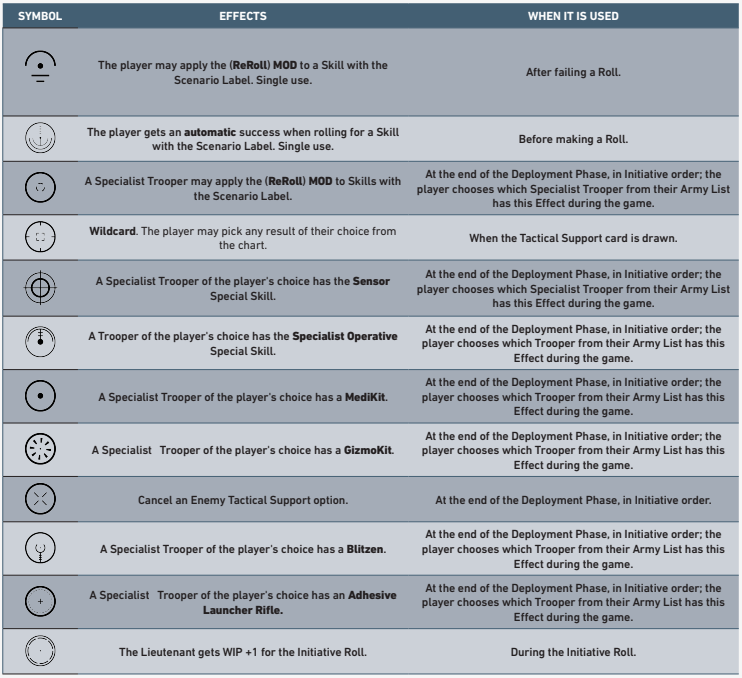
Each scenario specifies the number of Tactical Support options the player has. In ITS games, the selection of Tactical Support options must always be done using the Tactical Objectives Deck. Players must draw their Tactical Support options after choosing one of their two Army Lists.
Each player must remove all the Tactical cards without a symbol from the Tactical Objective Deck (King of the Hill, Central Control, Z Domination and, N Domination). Then each player must shuffle their own Tactical Objective Deck in front of their opponent, and draw the number of cards specified in the scenario. Tactical Support options are Open Information.
The Trooper chosen to recieve a Tactical Support Option must be always one of the models deployed on the game table. Players are not allowed to choose Troopers in Hidden Deployment or in Marker state. This Trooper must always be on the game table as a Model and not as a Marker (Camouflaged, Holoecho…). Also, Irregular Troops and those whose Troop Type is REM or VH are not eligible to receive a Tactical Support Option.
Roll 1d20 on this chart for the second Speedball Token (first is player choice). Items are single-use/non-transferable.
VitaPack: Cancel Unconscious (Vitality Trooper, 1 Wound).
AutoRepairS: Cancel Unconscious (STR Trooper, 1-2 Wounds).
Switch On: Cancel IMM-A/B, Isolated, Stunned.
Jetpack: Gain Super-Jump (Jet Propulsion) for one order only. Restricted to Troopers with S2.
Overkill: The first mode allows its user to cancel their Unloaded State and regain all expended uses of their Disposable weapons or pieces of Equipment, in the Conclusion Step of the Order. Alternatively, the second mode grants the user the BS Attack (SR-1) Skill during one Order only.
NanoShield: If a Trooper has to make any Saving Rolls, they must automatically apply a +2 MOD to all their Saving Rolls in the Resolution Step 5 of that Order.
300‑point table & deployment